Showing posts with label programming. Show all posts

Monday, July 14, 2014

Introducing gavftools

1. Introduction
 
The goal when developing the gavf-Format was mainly to have a universal pipe format, which can be used to stream multimedia content from one program to another.
In apps/gavftools, there is a bunch of commandline programs I wrote for making my everyday multimedia work much easier. They allow to build quite complex processing pipelines from the commandline.
The basis is the gavf multimedia format, which can contain audio, video as well as text- and graphical subtitles. A/V data can be either uncompressed or compressed in a large number of formats. In some cases, especially for uncompresed video, the video frames are passed as shared memory segments between the processes.
All programs are prefixed by gavf-. All programs can be called with the -help argument to show commandline options.

2. Simple examples

Read a media file and convert it to the gavf format:

gavf-decode -i file.avi -o file.gavf

or:

gavf-decode -i file.avi > file.gavf

Play a media file:

gavf-decode -i file.avi | gavf-play

3. I/O variants

Playing a media file can happen in many ways. Instead of

gavf-decode -i file.avi | gavf-play

You can use a unix-domain socket:

gavf-decode -i file.avi -o unixserv://socket
gavf-play -i unix://socket

(of course the 2 commands should be called in different terminals or the first command should be put into the background). You can also use a fifo:

mkfifo fifo
gavf-decode -i file.avi -o fifo
gavf-play -i fifo

Or a TCP socket:

gavf-decode -i file.avi -o httpserv://192.128.100.1:8888
gavf-play -i http://192.128.100.1:8888

Naturally in the last example the decode and playback commands can run on different machines.

Shared memory segments are always used if the maximum packet size is known in advance and the receiver is a process (i.e. not a file) running on the same machine.

4. Other commands

Recompress the the audio stream to 320 kbps mp3. This can also be used to recompress audio and video simultaneously:

... | gavf-recompress -ac 'codec=c_lame{cbr_bitrate=320}' | ....

Split audio- and video stream into separate files:

... | gavf-demux -oa audio.gavf -ov video.gavf

Multiplex separate streams:

gavf-mux -i audio.gavf -i video.gavf | ....

Display info about the stream (don't do anything else)

... | gavf-info

Split a stream for multiple receivers (can also use more than 2 -o options):

... | gavf-tee -o saved_file.gavf -o "|gavf-play"

Record a stream from your webcam and from your soundcard (replace pulseaudio_device with something meaningful):

gavf-record -vid 'plugin=i_v4l2{device=/dev/video0}' -aud 'plugin=i_pulse{dev=pulseaudio_device}' | ...

Convert an audio-only stream to mp3. If the audio compression is mp3 already, it is written as it is, else it is encoded with 320 kbps:

... | gavf-encode -enc "a2v=0:ae=e_lame" -ac cbr_bitrate=320 -o file.mp3

Flip video images vertically:

... | gavf-filter -vf 'f={fv_flip{flip_v=1}}' | ....

Can also be used for adding audio filters with the -af option. Filters can also be chained.

Wednesday, April 3, 2013

gavf: A multimedia container format for gmerlin

Introduction

Having programmed a lot of demultiplexers in gmerlin-avdecoder I found out that there is no ideal container format. For my taste an ideal container format
  • Is as codec agnostic as possible, i.e. doesn't require codec specific hacks in (de-)multiplexers. AVI is surprisingly good in this respect. Ogg and mov/mp4 fail miserably here.
  • Supports sample accurate timing. This means that all streams have timestamps in their native timescale. This is solved well in Ogg and mp4, while matroska and many other formats fail.
  • Is fully streamable. This means that a stream can be encoded from a live source and sent over a (non-seekable) channel like a socket. Ogg streams have this property but mov/mp4 doesn't.
  • Is as simple as possible.
Designing a multimedia format for gmerlin was mostly a matter of serializing the C-structs, which were already present in gavl, like A/V formats, compression descriptions and metadata. Furthermore I used some tricks:
  • Use variable length integers like in matroska but extended for 64 bit
  • Introduce so called synchronization headers. They come typically before video keyframes and contain timestamps of the next packets for all elementary streams. If you seek to a sync header you have the full information about the timing when you restart decoding from that point.
  • Write timestamps relative to the last sync header. This means smaller numbers (fewer bytes) but full accuracy and 64 bit resolution. A similar approach is found in matroska files.
  • Eliminate redundant fields. E.g. a video stream with constant framerate and no B-frames doesn't need per-frame timestamps at all.
  • Split global per-stream information into a header (at the beginning of a file) and a footer (at the end of the file). For decoding the file (e.g. when streaming) the header is sufficient. The footer contains e.g. the indices for seeking. In the case of a live stream, there is no footer at all. But it can be generated trivially when the stream is saved to a file.
  • Make bitstream-level parsing of the elemtary streams unnecessary. This means that some fields, which might come handy on the demuxer level, are available in the container format. Examples are the frame type (I-, P- or B-frame) and timecodes.
  • Support arbitrary global and per-stream metadata
  • Allow to update the global metadata on-the-fly. This allows to wrap webradio streams into gavf streams without loosing the song titles.
  • Support chapters and subtitles (text based and graphical).
Motivation

Now the question is, why yet another multimedia format? Well it's true that there are way too many formats out there as every multimedia programmer knows too well. So let me make clear why I developed gavf. I wanted:
  • to store uncompressed A/V data in all formats, which are supported by gavl. This is especially important for testing and debugging
  • to save a compressed stream (e.g. from an rtsp source) without depending on 3rd party libraries
  • to transfer A/V streams from one gmerlin program to another via a pipe or a socket.
  • to prove, that I can design a format, which is better than all the others :)
All these goals couldn't be met with any existing container format, but they are all met by gavf, so it was worth the effort.

Supported codecs

As mentioned already, gavf supports compressed and uncompressed data. In the uncompressed case, the format is completely defined by the audio- or video format, the ID of the compression info is set to GAVL_CODEC_ID_NONE then. For audio streams, the compression can be one of the following:
  • alaw
  • ulaw
  • mp2
  • mp3
  • AC3
  • AAC
  • Vorbis
  • Flac
  • Opus
  • Speex
For video, we support:
  • JPEG
  • PNG
  • TIFF
  • TGA
  • MPEG-1
  • MPEG-2
  • MPEG-4 (a.k.a. Divx)
  • H.264 (including AVCHD)
  • Theora
  • Dirac
  • DV (several variants)
  • VP8
These allow to wrap a huge number of formats into gavf streams. Adding new codecs is mostly a matter of defining them in gavl/compression.h and adding support for them in gmerlin-avdecoder at least.

Application support

I won't promote gavf as a container format for interchanging multimedia content. In fact the current design makes it even impossible. The gavf format can change without a warning from one gavl version to another. And there are no version fields inside gavf files to ensure backward compatibility. For now, I use it exclusively for passing files between gmerlin applications of the same version.

If, however, someone likes gavf so much that he or she wants it to be more wide spread, it needs some additional work. First of all we need a formal specification document. Secondly we need to add version fields to the internal data structures so one can write backwards compatible (de-)muxers. None of these will be done by me though.

The current svn version of gmerlin has some support for gavf:
  • A reference (de-)multiplexer in gavl (gavl/gavf.h)
  • gavf demultiplexing support in gmerlin-avdecoder
  • An encoder plugin for creating gavf files with gmerlin_transcoder. It supports compressing with the standalone codecs
  • A connector for reading and writing gavf streams via regular files, pipes and sockets. It's the basis of the gavftools, which will be described in another post.

Tuesday, April 2, 2013

Standalone codec plugins for gmerlin

After having implemented the A/V connectors for gmerlin, it was easy to implement standalone codec plugins, which (de-)compress an A/V stream. This means that in addition to simplified A/V processing with on-the-fly format conversion we can also do on-the-fly (de-)compression. There is just one plugin type (for compression and decompression of audio and video): bg_codec_plugin_t defined in gmerlin/plugin.h. In addition to the common stuff (creation, destruction, setting parameters), there are a number of functions, which are specific to codec functionality. For decompression these are:

gavl_audio_source_t * (*connect_decode_audio)(void * priv,
                                              gavl_packet_source_t * src,
                                              const gavl_compression_info_t * ci,
                                              const gavl_audio_format_t * fmt,
                                              gavl_metadata_t * m);

gavl_video_source_t * (*connect_decode_video)(void * priv,
                                              gavl_packet_source_t * src,
                                              const gavl_compression_info_t * ci,
                                              const gavl_video_format_t * fmt,
                                              gavl_metadata_t * m);

The decompressor will get the compressed packets from the packet source. Additional arguments are the compression info, the format (which might be incomplete) and the metadata of the A/V stream. They return an audio- or video source, from where you can read the uncompressed frames.

For opening a compressor, we need to call one of:

gavl_audio_sink_t * (*open_encode_audio)(void * priv,
                                         gavl_compression_info_t * ci,
                                         gavl_audio_format_t * fmt,
                                         gavl_metadata_t * m);

gavl_video_sink_t * (*open_encode_video)(void * priv,
                                         gavl_compression_info_t * ci,
                                         gavl_video_format_t * fmt,
                                         gavl_metadata_t * m);

gavl_video_sink_t * (*open_encode_overlay)(void * priv,
                                           gavl_compression_info_t * ci,
                                           gavl_video_format_t * fmt,
                                           gavl_metadata_t * m);

It will return the sink where we can push the A/V frames. The other arguments are the same as if we open a decoder, but in this case they will be changed by the call. After opening the compressor and before passing the first frame, we need to set a packet sink where the compressed packets will be written:

void (*set_packet_sink)(void * priv, gavl_packet_sink_t * s);

The decompressors work in pull mode, the compressors work in push mode. These are the most suitable modes in typical usage scenarios.

The potential delay between compressed packets and uncompressed frames is handled internally. The decompressor simply reads enough packets to it can output one uncompressed frame. The compressor outputs compressed frame as they become available. When the compressor is destroyed, it might flush it's internal state resulting in one or more compressed packets to be written. This means that at the moment you destroy a compressor, the packet sink must still be able to accept packets.

There are decompressor plugins as part of gmerlin-avdecoder, which handle most formats. The gmerlin-encoders package contains compressor plugins for most formats as well.

Software A/V connectors for gmerlin

As mentioned earlier, I programmed generic connectors for A/V frames and compressed packets. They are much more sophisticated than the old API (based on callback functions), because they also do implicit format conversion and buffer management. The result is a simplified plugin API (consisting of fewer functions) and simplified applications. The stuff is implemented in gavl (include gavl/connectors.h), so it can be used in gmerlin as well as in gmerlin_avdecoder without introducing new library dependencies. There are 3 types of modules:
  • Sources work in pull mode and do format conversion. They are used by input- and recording plugins
  • Sinks work in push mode and are used by output and encoding plugins
  • Connectors connect multiple sinks to a source
Example for the API usage
Assuming you want to read audio samples from a media file and send it to a sink. When you get an audio source (e.g. from gemerlin_avdecoder with bgav_get_audio_source()), your application can look like:

gavl_audio_source_t * src;
gavl_audio_sink_t * sink;
gavl_audio_frame_t * f;
gavl_source_status_t st;

/* Get source */
src = bgav_get_audio_source(dec, 0);

/* Tell the source to deliver the format needed by the sink */
gavl_audio_source_set_dst(src, 0, gavl_audio_sink_get_format(sink));

/* Processing loop */
while(1)
  {
  /*  Get a frame of internally allocated memory from the sink 
   *  (e.g. shared or mmamp()ed memory). Return value can be NULL.
   */
  f = gavl_audio_sink_get_frame(sink);

  /* Read a frame from the source, if f == NULL we'll get a frame 
   * allocated and owned by the source itself
   */
  st = gavl_audio_source_read_frame(src, &f);

  if(st != GAVL_SOURCE_OK)
    break;

  if(gavl_audio_sink_put_frame(sink, f) != GAVL_SINK_OK)
    break;
  }


If you want to use the gavl_audio_connector_t, things get even a bit simpler:

gavl_audio_source_t * src;
gavl_audio_sink_t * sink;
gavl_audio_connector_t * conn;

/* Get source */
src = bgav_get_audio_source(dec, 0);

/* Create connector */
conn = gavl_audio_connector_create(src);

/* Connect sink (you can connect multiple sinks) */
gavl_audio_connector_connect(conn, sink);

/* Initialize */
gavl_audio_connector_start(conn);

/* Processing loop */
while(gavl_audio_connector_process(conn))
  ;

The gmerlin plugin API was changed to use only the sources and sinks for passing around frames. Text subtitles are transported in gavl packets, overlay subtitles are transported in video frames.

In addition to the lower level gavl converters, the sources support some more format conversions. For audio frames, we do buffering such that the number of samples per frame you read from the source can be different from what the source natively delivers. For video, we support a simple framerate conversion, which works by repeating of dropping frames.

The video processing API is completely analogous to the audio API described above. For compressed packets, things are slightly different because we don't do format conversion on compressed packets.

A number of gmerlin modules (e.g. the player and transcoder) are already converted to the new API. In many cases, lots of redundant code could be kicked out, so the resulting code is much simpler and easier to understand.

Wednesday, February 13, 2013

Gmerlin architecture changes

It was a long time ago that I wrote something about the latest gmerlin developments. The reason for that is, that most of the time I was too busy coding and too lazy for documenting stuff. For the latter you need a stable architecture and the architecture changes a bit during the development. I usually think a lot before starting coding. But at some point I need to flush my brain and fine tune things later when I have some working applications.

The gmerlin architecture was reworked dramatically with the following goals:
  1. Implement generic source and sink connectors for transporting A/V frames and (compressed) packets inside one application. These do automatic format conversion and optimized buffer handling.
  2. Change the handling of A/V streams throughout all libraries to use the new connectors. This includes gmerlin-avdecoder as well as the gmerlin plugin API.
  3. Implement standalone codec plugins for on-the-fly (de-)compression of A/V streams.
  4. Define (yet another) Multimedia container format. It can be used as an on-disk format but also (and more importantly) as a generic pipe format for connecting commandline applications. Think of it as a more generic version of the yuv4mpeg format. It is called gavf.
  5. Define an interprocess transport mechanism for gavf streams through pipes or sockets. On machine local connections it can pass A/V frames through shared memory for increased efficiency.
  6. Write a bunch of commandline tools for generating and processing gavf streams, which can be connected in every imaginable way on the Unix commandline. This was the ultimate goal I had in my mind :)
Not everything is finished yet. I'll document each of these subprojects in separate posts.

Thursday, December 9, 2010

New prereleases

Lots of bugs have been fixed after the last prereleases, so here are
new ones:

http://gmerlin.sourceforge.net/gmerlin-dependencies-20101209.tar.bz2
http://gmerlin.sourceforge.net/gmerlin-all-in-one-20101209.tar.bz2

The good news is, that no new features were added so the code can stabilize better.

Please test this and report any problems.

The final gmerlin release is expected by the end of the year

Saturday, August 7, 2010

Gmerlin configuration improvements

Up to now, gmerlins configuration philosophy was simple: Export all user settable parameters as possible to the frontends, no matter now important they are. There are 2 reasons for that:
  • As a developer, I don't like to decide which configuration options are important.
  • As a user I (personally) want to have full control over all program-and plugin settings. Nothing annoys me more in other applications than features, which could easily achieved by the backend, but they are not supported in the frontend.
The downside of this approach is simple: For an average user, the gmerlin applications are way too complicated. And of course, for me it's also annoying to tweak that many parameters all the time. Now, since I reach a one-zero version, It's time to look at such usability issues.

A little look behind the GUI
A configuration dialog can contain of multiple nested sections. If you have more than one section, you see a tree structure on the right, which lets you select the section. A section contains all the configuration widgets you can see at the same time. Therefore the code must always distinguish if an action is for a section or for the whole dialog.

Factory defaults
Most configuration sections now have a button Restore factory defaults. It does, what the name suggests. You can use this if you think you messed something up.

Presets
Some configuration sections support presets. You can save all parameters into a file and load them again after. In some situations, presets are per section. In this case you see the preset menu below the parameter widgets. If the presets are global for the whole dialog window, you see the menu below the tree view. The next image shows a single-section dialog with the preset menu next to the restore button.


The next image shows a dialog with multiple sections. The preset menu is for the whole dialog, the restore button is for the section only.


The presets are designed such, that multiple applications can share them. E.g. an encoding setup configured in the transcoder can be reused in the recorder etc. Presets are available for:
  • All plugins (always global for the whole plugin)
  • Whole encoding setups
  • Filter chains
There is no reason, not to support presets for other configurations as well. Suggestions are welcome.

Tuesday, August 3, 2010

Gmerlin prereleases

gmerlin prereleases can be downloaded here:

http://gmerlin.sourceforge.net/gmerlin-dependencies-20100803.tar.bz2

http://gmerlin.sourceforge.net/gmerlin-all-in-one-20100803.tar.bz2

Highlights of this development iteration:
Please test this as much as possible and report any problems.

Sunday, August 1, 2010

Getting serious with sample accuracy

gmerlin-avdecoder has a sample accurate seek API for some time now. What was missing was a test to prove that seeking happens really with sample accuracy.

Test tool
The strictest test if a decoder library can seek with sample accuracy is to seek to a position, decode a video frame or a bunch of audio samples. Compare these with the frame/samples you get if you decode the file from the beginning. Of course, the timestamps must also be identical. A tool, which does this, is in tests/seektest.c. I noticed, that video streams easily pass this test, usually even if no sample accurate access was requested. That's probably because I thought, that video streams are more difficult. So I put more brainload into them. Therefore I'll concentrate on audio streams in this post.

Audio codec details
When seeking in video streams, you have keyframes, which tell you where decoding of a stream can be resumed after a seek. It's sometimes difficult to implement this, but at least you always know what to do.

The naive approach for audio streams is to assume, that all blocks (e.g. 1152 samples for mp3) can be decoded independently. Unfortunately, reality is a bit more cruel:

Bit reservoir
This is a mechanism, which allows to make pseudo VBR in a CBR stream. If a frame can be encoded with fewer bits than allocated for the frame, it can leave the remaining bits to a subsequent (probably more complex) frame. The downside of this trick is, that after a seek, the next frame might need bits from previous frames to be fully decoded.

Oberlapping transform
Most audio compression techniques work in the frequency-domain, so between the audio signal and the compression stage, there is some kind of fft-like transform.

Now, for reasons beyond this post, overlapping transforms are used by some codecs. This means, that for decoding the first samples of a compressed block, you need the last samples of the previous block. The image below shows one channel of an AAC stream for the case that the overlapping was ignored when seeking. You see that the beginning of the frame is not reconstructed properly, because the previous frame is missing.


Both the bit reservoir and the overlapping can be boiled down to a single number, which tells how many sample before the actual seek point the decoder must restart decoding. This number is set by the codec during initialization, and it's used when we seek with sample accuracy.

Mysterious liba52 behavior
Even if sample accuracy was achieved, the AC3 streams (which are on DVDs or in AVCHD files) don't achieve bit exactness. The image below shows, that there is no time shift between the signals (which means that gmerlin-avdecoder seeks correctly), but the values are not exactly the same.


First I blamed the AC3 dynamic range control for this behavior. Dynamic range compressors always have some kind memory across several frames. But even after disabling DRC, the difference was still there. I would really be curious if that's a principal property of AC3 being non-deterministic or if it's a liba52 bug.

Conclusions
The table below lists all audio codecs, which were taken into consideration. They represent a huge percentage of all files found in the wild. The next important codecs are the uncompressed ones, but these are always sample accurate.


Compression Library OverlapBit reservoir Bit exact
MPEG-1, layer II libmad - - +
MPEG-1, layer IIIlibmad + + +
AAC faad2 + ? (assumed -) +
AC3 liba52 + ? (assumed -) - (see image above)
Vorbis libvorbis + - +

Obtaining the information summarized here was a very painful process with web researches and experiments. The documentation of the decoder libraries regarding sample accurate and bit exact seeking is extremely sparse if not non-existing.

Saturday, May 1, 2010

Processing compressed streams with gmerlin

As I already mentioned, a main goal of this development cycle is to read compressed streams on the input side and write compressed streams on the encoding side. It's a bit of work, but it's definitely worth it because it offers enormous possibilities:
  • Lossless transmultiplexing from one container to another
  • Adding/removing streams of a file without recompressing the other streams.
  • Lossless concatenation of compressed files
  • Changing metadata of files (i.e. mp3/vorbis tagging)
  • Quicktime has some codecs, which correspond to image formats (png, jpeg, tiff, tga). Supporting compressed frames can convert single images to quicktime movies and back
  • In some cases broken files can be fixed as well
General approach
To limit the possibilities of creating broken files, we are a bit strict about the
codecs we support for compressed I/O. This means, that with the new feature you cannot automatically transfer all compressed streams. For compressed I/O the following conditions
must be met:
  • The precise codec must be known to gavl. While for decoding it never matters if we have MPEG-1 or MPEG-2 video (libmpeg2 decodes both), for compressed I/O it must be known.
  • For some codecs, we need other parameters like the bitrate or if the stream contains B-frames or field pictures.
  • Each audio packet must consist of an independently decompressable frame and we must know, how many uncompressed samples are contained.
  • For each video packet, we must know the pts, how long the frame will be displayed and if it's a keyframe.
Compression support in gavl
For transferring compressed packets, we need 2 data structures:
  • An info structure, which describes the compression format (i.e. the codec). The actual codec is an enum (similar to ffmpegs CodecID), but other parameters can be required as well (see above).
  • A structure for a data packet.
Both of these are in gavl in a new header file gavl/compression.h. Gavl itself never messes around with the contents of compressed packets, if just provides some housekeeping functions for packets and compression definitions. The definitions were moved here, because it's the only common dependency of gmerlin and gmerlin-avdecoder and I didn't want to define that twice.

gmerlin-avdecoder
There are 2 new functions for getting the compression format of A/V streams:
int bgav_get_audio_compression_info(bgav_t * bgav, int stream,
gavl_compression_info_t * info)

int bgav_get_video_compression_info(bgav_t * bgav, int stream,
gavl_compression_info_t * info)
They can be called after the track was selected with bgav_select_track(). If the demuxer doesn't meet the above goals for a stream it's tried with a parser. If there is no parser for this stream, compressed output fails and the functions return 0.

If you decided to read compressed packets from a stream, pass BGAV_STREAM_READRAW to bgav_set_audio_stream() or bgav_set_video_stream(). Then you can read compressed packets with:
int bgav_read_audio_packet(bgav_t * bgav, int stream, gavl_packet_t * p);

int bgav_read_video_packet(bgav_t * bgav, int stream, gavl_packet_t * p);
There is a small commandline tool bgavdemux, which writes the compressed packets to raw files, but only if the compression supports a raw format. This is e.g. not the case for vorbis or theora.

libgmerlin
In the gmerlin library, the new feature shows up mainly in the plugin API. The input plugin (bg_input_plugin_t) got 4 new functions, which have the identical meaning as their counterparts in gmerlin-avdecoder:
int (*get_audio_compression_info)(void * priv, int stream,
gavl_compression_info_t * info);

int (*get_video_compression_info)(void * priv, int stream,
gavl_compression_info_t * info);

int (*read_audio_packet)(void * priv, int stream, gavl_packet_t * p);

int (*read_video_packet)(void * priv, int stream, gavl_packet_t * p);

On the encoding side, there are 6 new functions, which are used for querying if compressed writing is possible, adding compressed A/V tracks and writing compressed A/V packets:
int (*writes_compressed_audio)(void * priv,
const gavl_audio_format_t * format,
const gavl_compression_info_t * info);

int (*writes_compressed_video)(void * priv,
const gavl_video_format_t * format,
const gavl_compression_info_t * info);

int (*add_audio_stream_compressed)(void * priv, const char * language,
const gavl_audio_format_t * format,
const gavl_compression_info_t * info);

int (*add_video_stream_compressed)(void * priv,
const gavl_video_format_t * format,
const gavl_compression_info_t * info);

int (*write_audio_packet)(void * data, gavl_packet_t * packet, int stream);

int (*write_video_packet)(void * data, gavl_packet_t * packet, int stream);
gmerlin-transcoder
In the gmerlin transcoder you have a configuration for each A/V stream:

The options for the stream can be "transcode", "copy (if possible)" or "forget". Copying of a stream is possible if the following conditions are met:
  • The source can deliver compressed packets
  • The encoder can write compressed packets of that format
  • No subtitles are blended onto video images
All filters are however completely ignored. You can configure any filters you want, but when you choose to copy the stream, none of them will be applied.

If a stream cannot be copied, it will be transcoded.

libquicktime
Another major project was support in libquicktime. It's a bit nasty because libquicktime codecs do tasks, which should actually be done by the (de)multiplexer. In practice this means that compressed streams have to be enabled for each codec and container separately. The public API is in compression.h. It was modeled after the functions in libgmerlin, but the definition of the compression (lqt_compression_info_t) is slightly different because inside libquicktime we can't use gavl.

I made a small tool lqtremux. It can either be called with a single file as an argument, in which case all A/V streams are exported to separate quicktime files. If you pass more than one file on the commandline, the last file is considered the output file and all tracks of all other files are multiplexed into the output file. Note that lqtremux is a pretty dumb application, which was written mainly as a demonstration and testbed for the new functionality. In particular you cannot copy some tracks while transcoding others. For more sophisticated tasks use gmerlin-transcoder or write your own tool.

Status and TODO
Most major codecs and containers work, although not all of them are heavily tested. Therefore I cannot guarantee, that files written that way will be compatible with all other decoders. Future work will be testing, fixing and supporting more codecs in more containers. Of course any help (like bugreports or compatibility testing on windows or OSX) is highly appreciated.

With this feature my A/V pipelines are ready for a 1.x version now.

Saturday, March 20, 2010

libtheora vs. libschrödinger vs. x264

Doing a comparison of lossy codecs was always on my TODO list. That's mostly because of the codec-related noise I read (or skip) on mailing lists and propaganda for the royality free codecs with semi-technical arguments but without actual numbers. A while ago I made some quick and dirty PSNR tests, where x264 turned out to be the clear winner. But recently we saw new releases of libtheora and libschrödinger with improved encoding quality, so maybe now is the time to investigate things a bit deeper.

Specification vs implementation
With non-trivial compression techniques (and all techniques I tried are non-trivial) you must make a difference between a specification and an implementation. The specification defines how the compressed bitstream looks like, and suggests how the data can be compressed. I.e. it specifies if motion vectors can be stored with subpixel precision or if B-frames are possible. The implementation does the actual work of compressing the data. It has a large degree of freedom e.g. it lets you choose between several motion estimation methods or techniques for quantization or rate control. If you fully read and understood all specifications, you can make a rough estimation, which specification allows more powerful compression. But if you want numbers, you can only compare implementations.

This implies, that statements like "Dirac is better than H.264" (or vice versa) are inherently idiotic.

Candidates
  • libschroedinger-1.0.9
  • libtheora-1.1.0
  • x264 git version from 2010-03-19
Rules of the game
If compression algorithms are completely different, it's not easy to find comparable codec parameters. Some codecs are very good for VBR encoding but suck when forced to CBR. Some codecs are optimized for low-bitrate, others are work better at higher bitrates. Therefore I decided for very simple test rules:
  • All codec settings are set to their defaults found in the sourcecode of the libraries. This leaves the decision of good parameters to the developers of the libraries. I upgraded the codec parameters in libquicktime and the gmerlin encoding plugins for the newest library versions.
  • The only parameter, which is changed, corresponds to the global quality of the compression (all libraries have such a parameter). Multiple files are encoded with different quality settings.
  • From the encoded files the average bitrate is calculated and the quality (PSNR and MSSIM) is plotted as a function of the average bitrate.
Footage
Some lossless sequences in y4m format can be downloaded from the xiph site. I wanted a file, which has fast global motion as well as slower changing parts. Also the uncompressed size shouldn't be too large to keep the transcoding- and analysis time at a reasonable level. Therefore I decided to use the foreman. Of course for a better estimation you would need much more and longer sequences. Feel free to repeat the experiment with other files and tell about the results.

Analysis tool
I wrote a small tool gmerlin_vanalyze, which is called with the original and encoded files as only arguments. It will then output something like:
0 33385 47.137417 0.992292
1 17713 45.936294 0.989990
2 17693 45.998659 0.990233
3 17361 46.008802 0.990297
4 19253 46.144632 0.990582
5 19005 46.179699 0.990648

....

295 24454 45.174282 0.993100
296 23841 44.653152 0.992318
297 20966 43.848303 0.991013
298 13941 41.996157 0.987494
299 11682 41.852630 0.987321
# Average values
# birate PSNR SSIM
# 4941941.26 46.075177 0.991434

Each line consists of:
  • Frame number
  • Compressed size of this frame in bytes
  • Luminance PSNR in dB of this frame
  • Mean SSIM of this frame
The summary at the end consists of the total video bitrate (bits/second) as well as PSNR and SSIM averaged over all frames.

You can get this tool if you upgrade gavl, gmerlin and gmerlin-avdecoder from CVS. It makes use of a brand new feature (extracting compressed frames), which is needed for the video bitrate calculation (i.e. without the overhead from the container).

Results
See below for the PSNR and MSSIM results for the 3 libraries.


Conclusion
The quality vs. bitrate differences are surprisingly small. While x264 still wins, the royality free versions lag behind by just 2-3 dB of PSNR. Also surprising is that libtheora and libschroedinger are so close together given the fact, that Dirac has e.g. B-frames, while theora has just I- and P-frames. Depending on your point of view, this is good news for libtheora or bad news for libschroedinger

Another question is of course, if this comparison is completely fair. A further project could now be to take the codecs and tweak single parameters to check, how the quality can be improved. Also one might add other criteria like encoding-/decoding speed as well. Making tests with different types of footage would also give more insight.

To summarize that, I don't state that these numbers are the final wisdom. But at least they are numbers, and neither propaganda nor marketing.

Saturday, February 6, 2010

AVCHD timecode update

After this post I got some infos from a cat, which helped me to understand the AVCHD metadata format much better. This post summarizes, what I currently know.

AVCHD metadata are stored in an SEI message of type 5 (user data unregistered). These messages start with a GUID (indicating the type of the data). The rest is not specified in the H.264 spec. For AVCHD metadata the data structure is as follows:

1. The 16 byte GUID, which consists of the bytes

0x17 0xee 0x8c 0x60 0xf8 0x4d 0x11 0xd9 0x8c 0xd6 0x08 0x00 0x20 0x0c 0x9a 0x66

2. 4 bytes

0x4d 0x44 0x50 0x4d

which are "MDPM" in ASCII.

3. One byte, which specifies the number of tags to follow

4. Each tag begins with one byte specifying the tag type followed by 4 bytes of data.

The date and time are stored in tags 0x18 and 0x19.

Tag 0x18 starts with an unknown byte. I saw values between 0x02 and 0xff in various files. It seems however that it has a constant value for all frames in a file. The 3 remaining bytes are the year and the month in BCD coding (0x20 0x09 0x08 means August 2009).

The 4 bytes in tag 0x19 are the day, hour, minute and second (also BCD coded).

There are more informations stored in this SEI message, check here for a list.

If you want to make further research on this, you can download gmerlin-avdecoder from CVS, open the file lib/parse_h264.c and uncomment the following line (at the very beginning):

// #define DUMP_AVCHD_SEI

Then you can use bgavdump on your files. It will decode the first 10 frames from the file. If you want to decode e.g. 100 frames, use

bgavdump -nf 100 your_file.mts

Wednesday, January 27, 2010

Video quality characterization techniques

When developing video processing algorithms and tuning them for quality, one needs proper measurement facilities, otherwise one will end up doing voodoo. This post introduces two prominent methods for calculating the differences of two images (the "original" and the "reproduced" one) and get a value, which allows to estimate, how well the images coincide.

PSNR
The most prominent method is the PSNR (peaked signal-to-noise ratio). It is based on the idea, that the reproduced image consists of the original plus a "noise signal". The noise level can be characterized by the signal-to-noise ratio and is usually given in dB. Values below 0 dB mean that the noise power is larger than the signal. For identical images (zero noise), the PSNR is infinite.

Advantage is, that it's a well established method and the calculation is extremely simple (see here for the formula). Disadvantage is, that it is a purely mathematical calculation of the noise power, while the human psychovisual system is completely ignored.

Thus, one can easily to make 2 images, which have different types of compression artifacts (i.e. from different codecs) and have the similar PSNR compared to the original. But one looks much better than the other. Therefore, current opinion among specialists is, that PSNR can be used or optimizing one codec, while it fails for comparing different codecs. Unfortunately, many codec comparisons in the internet still use PSNR.

SSIM
SSIM (structural similarity) was fist suggested by Zhou Wang et.al. in the paper "Image Quality Assessment: From Error Visibility to Structural Similarity" (IEEE Transactions on image processing, Vol. 13, No. 4, April 2004, PDF).

The paper is very well written and I recommend anyone, who is interested, to read it. In short: The structural similarity is composed of 3 values:
  • Luminance comparison
  • Contrast comparison
  • Structure comparison
All these components are normalized such that they are 1.0 for identical images. The SSIM index is the product of the 3 components (optionally raised by an exponent). Obviously the product will be normalized as well.

A difference to PSNR is, that the SSIM index for a pixel is calculated by taking the surrounding pixels into account. It calculates some characteristic numbers known from statistics: The mean value, the standard deviation and correlation coefficient.

One problem with the SSIM is, that the algorithm has some free parameters, which are slightly different in each implementation. Therefore you should be careful when comparing your results with numbers coming from a different routine. I took the parameters from the original paper, i.e. K1 = 0.01, K2 = 0.03 and an 11x11 Gaussian window with a standard deviation of 1.5 pixels.

Implementations
Both methods are available in gavl (SSIM only in CVS for now), but their APIs are slightly different. To calculate the PSNR, use:
void gavl_video_frame_psnr(double * psnr,
const gavl_video_frame_t * src1,
const gavl_video_frame_t * src2,
const gavl_video_format_t * format);

The src1, src2 and format arguments are obvious. The result (already in dB) is returned in psnr for each component. The order is RGB(A), Y'CbCr(A) or Gray(A) depending on the pixelformat. PSNR can be calculated for all pixelformats, but usually one will use a Y'CbCr format and take only the value for the Y' component. In all my tests the PSNR values for chrominance were much higher, so the luminance PSNR is the most pessimistic (i.e. most honest) value.

For SSIM you can use:
int gavl_video_frame_ssim(const gavl_video_frame_t * src1,
const gavl_video_frame_t * src2,
gavl_video_frame_t * dst,
const gavl_video_format_t * format);
The arguments src1, src2 and format are the same as for PSNR. The pixelformat however must be GAVL_GRAY_FLOAT, implying that only the luminance is taken into account. This decision was made after the experiences with PSNR. The SSIM indices for each pixel is then returned in dst, which must be created with the same format. The MSSIM (mean SSIM) for the whole image can then be obtained by averaging the SSIM values over all pixels. The function returns 1 if the SSIM could be calculated or 0 if the pixelformat was not GAVL_GRAY_FLOAT or the image is smaller than the 11x11 window.

It never matters which image is passed in src1 and which in src2 because both algorithms are symmetric.

Example
Below you see 11 Lena images compressed with libjpeg at quality levels from 0 to 100 along with their PSNR, SSIM and file size:


Quality: 0, PSNR: 23.54 dB, SSIM: 0.6464, Size: 2819 bytes



Quality: 10, PSNR: 29.84 dB, SSIM: 0.8473, Size: 4305 bytes



Quality: 20, PSNR: 32.74 dB, SSIM: 0.9084, Size: 5890 bytes



Quality: 30, PSNR: 34.38 dB, SSIM: 0.9331, Size: 7376 bytes



Quality: 40, PSNR: 35.44 dB, SSIM: 0.9460, Size: 8590 bytes



Quality: 50, PSNR: 36.31 dB, SSIM: 0.9549, Size: 9777 bytes



Quality: 60, PSNR: 37.16 dB, SSIM: 0.9612, Size: 11101 bytes



Quality: 70, PSNR: 38.34 dB, SSIM: 0.9688, Size: 13034 bytes



Quality: 80, PSNR: 40.00 dB, SSIM: 0.9768, Size: 16410 bytes



Quality: 90, PSNR: 43.06 dB, SSIM: 0.9863, Size: 24308 bytes



Quality: 100, PSNR: 58.44 dB, SSIM: 0.9993, Size: 94169 bytes


With these numbers I made a plot, which shows the PSNR and SSIM as a function of the JPEG quality:
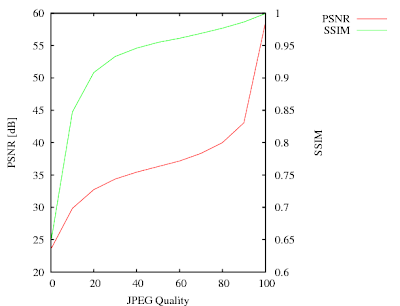
The JPEGs have the most visible differences for qualities between 0 and 40. In this range the SSIM curve has the largest gradient. Above 40 (where the visual quality doesn't change much), the SSIM becomes more or less linear and reaches almost 1 for the best quality.

The PSNR curve is a bit misleading. It has the steepest gradient for the highest quality. This is understandable because PSNR would become infinite for the lossless (perfect quality) case. It has however not much to do with the subjective impression. PSNR however is better for fine-tuning codecs at very high quality levels. That's because the PSNR values will change more strongly, while SSIM will always be almost one.

Now I have the proper tools to make a comparison of different video codecs.

Sunday, January 24, 2010

Disabling the X11 screensaver from a client

One of the most annoying experiences when watching videos with friends on cold winter evenings is, when the screensaver starts. Media players therefore need a way to switch that off by one or several means.

The bad news is, that there is no official method for such a trivial task, which works on all installations. In addition, there is the energy saving mode, which has nothing to do with the screensaver, and must thus be disabled separately.

The Xlib method
You get the screensaver status with XGetScreenSaver(), disable it with XSetScreenSaver() and restore it after video playback. Advantage is, that this method is core X11. Disadvatage is, that it never works.

Old gnome method
Older gnome versions had a way to ping the screensaver by executing the command:

gnome-screensaver-command --poke > /dev/null 2> /dev/null

Actually pinging the screensaver (which resets the idle timer) is a better method, because it restores the screensaver even if the player got killed (or crashed). The bad news is, that starting with some never gnome version (don't know exactly which), this stopped working. To make things worse, the command is still available and even gives zero return code, it's just a noop.

KDE
I never owned a Linux installation with KDE. But with a little help from a friends, I found a method. My implementation however is so ugly, that I won't show it here :)

The holy grail: Fake key events
After the old gnome variant stopped working for me, I finally found the XTest extension. It was developed to test XServers. I abuse it to send fake key events, which are handled indentically to real keystrokes. They will reset the idle counters of all screensaver variants, and will also disable the energy saving mode.

Also it's a ping approach (with the advantage described above). But it works with an X11 protocol request instead of forking a subprocess, so the overhead will be much smaller. The documentation for the XTest extension is from 1992, so I expect it to be present on all installations, which are sufficiently new for video playback.

Here is how I implemented it:

1. Include <X11/extensions/XTest.h>, link with -lXtst.

2. Test for presence of the XTest extension with XTestQueryExtension()

3. Get the keycode of the left shift key with XKeysymToKeycode()

4. Each 40 seconds, I press the key with

XTestFakeKeyEvent(dpy, keycode, True, CurrentTime);

5. One video frame later, I release the key with

XTestFakeKeyEvent(dpy, keycode, False, CurrentTime);

The one frame delay was done to make sure, that the press and release events will arrive with different timestamps. I don't want to know, what happens if press- and release-events for a key have identical timestamps.

This method will hopefully work forever, no matter what crazy ideas the desktop developers get in the future. Also, this is one more reason not to use any GUI toolkit for video playback. If you use Xlib and it's extensions, you have full access to all available features of X. When using a toolkit, you have just the features the toolkit developers think you deserve.

Tuesday, January 19, 2010

Gmerlin release on the horizon

New gmerlin prereleases are here:

http://gmerlin.sourceforge.net/gmerlin-dependencies-20100119.tar.bz2

http://gmerlin.sourceforge.net/gmerlin-all-in-one-20100119.tar.bz2

Changes since the last public release are:
  • Great player simplification. Most changes are internal, but the user should notice much faster seeking. Also the GUI player now updates the video window while the seek-slider is moved.
  • Simplification of the plugin configuration: In many places, where we had an extra dialog for configuring plugins, it was merged with the rest of the configuration.
  • A new recorder application which records audio (with OSS, Pulseaudio, Alsa, Jack and ESound) and video (with V4L1, V4L2 or the new X11 grabber). Output can be written into files or broadcasted.
  • A new encoding frontend (used by the recorder and transcoder), which allows more consistant and unified configuration of encoding setups.
  • The video window of the GUI player has now a gmerlin icon and is grouped together with the other windows.
  • Like always: Tons of fixes, optimizations and smaller cleanups in all packages. Got another 18% speedup when building AVCHD indexes for example.
This will be the last gmerlin release of the 0.3.X series. There are just 2 major features left, which keep me from releasing 1.0.0:
  • Support for compressed A/V frames in the architecture. This should allow lossless transmultiplexing with the transcoder.
  • Support for configuration presets: This will make using gmerlin applications much easier. The presets can be shared among application, i.e. once you found a good encoding preset, you can use it both in the transcoder and the recorder.


Please test it as much as you can and sent problem reports to the gmerlin-general list.

Monday, December 14, 2009

Flash-free live web video solution

Some time ago, we all knew that video on the web was equivalent to the proprietary Flash technology. Also I used to say, that there might be political or psychological reasons for using Ogg/Theora, but never technical ones.

Well, the conditions have changed recently so it's time to bring an update on this.

HTML 5 video tag
The HTML 5 draft supports a <video> tag for embedding a video into a webpage as a native html element (e.g. without a plugin). Earlier versions of the draft even recommended that browsers should support Ogg/Theora as a format for the video. The Ogg/Theora recommendation was then removed and a lot of discussion was started around this. This wikipedia article summarizes the issue. Nevertheless, there are a number of browsers supporting OggTheora video out of the box, among these is Firefox-3.5.

Cortado plugin
In a different development, the Cortado java applet for theora playback was written. It is GPL licensed and you can just download it and put it into your webspace.

Now the cool thing about the <video> tag is, that browsers, which don't know about it, will display the contents between <video> and </video>, so you can include the applet code there. Researching a bit about the best way to do this, I read that the (often recommended) <applet> mechanism is not valid html. A better solution is here.

Webmasters side
Now if you have the live-stream at http://192.168.2.2:8000/stream.ogg your html page will look like:
<html>
<head>
<meta http-equiv="content-type" content="text/html; charset=ISO-8859-1">
</head>
<body>
<h1>Test video stream</h1>
<video tabindex="0"
src="http://192.168.2.2:8000/stream.ogg"
controls="controls"
alt="Test video stream"
title="Test video stream"
width="320"
height="240"
autoplay="true"
loop="nolooping">
<object type="application/x-java-applet"
width="320" height="240">
<param name="archive" value="cortado.jar">
<param name="code" value="com.fluendo.player.Cortado.class">
<param name="url" value="http://192.168.2.2:8000/stream.ogg">
<param name="autoplay" value="true">
<a href="http://192.168.2.2:8000/stream.ogg">Test video stream</a>
</object>
</video>
</body>
</html>

Note that for live-streams the "autoplay" option should be given. If not, firefox will try to load the first image (automatically anyway) to show it in the video widget. Then it will stop downloading the live-stream until you click start. Pretty obvious that this will mess up live-streaming.


Server side
For live streaming I just installed the icecast server, which came with my ubuntu. I just changed the passwords in /etc/icecast/icecast.xml, enabled the server in /etc/default/icecast2 and started it with /etc/init.d/icecast2 start.

Upstream side
There are lots of programs for streaming to icecast servers, most of them use libshout. I decided to create a new family of plugins for gmerlin: Broadcasting plugins. They have the identical API as encoder plugins (used by the transcoder or the recorder). The only difference is, that they don't produce regular files and must be realtime capable.

Using libshout is extremely simple:
  • Create a shout instance with shout_new()
  • Set parameters with the shout_set_*() functions
  • Call shout_open() to actually open the connection to the icecast server
  • Write a valid Ogg/Theora stream with shout_send(). Actually I took my already existing Ogg/Theora encoder plugin and replaced all fwrite() calls by shout_send().
See below for the libshout configuration of the gmerlin Ogg broadcaster.


Of course, some minor details were left out in my overview, read the libshout documentation for them. As upstream client, I use my new recorder application.

The result
See below a screenshot from firefox while it plays back a live stream:


Open Issues
The live-video experiment went extremely smooth. I discovered however some minor issues, which could be optimized away:
  • Firefox doesn't recognize live-streams (i.e. streams with infinite duration) properly. It displays a seek-slider which always sticks at the very end. Detecting a http stream as live can easily be done by checking the Content-Length field of the http response header.
  • The theora encoder (1.1.1 in my case) might be faster than the 1.0.0 series, but it's still way too slow. Live encoding of a 320x240 stream is possible on my machine but 640x480 isn't.
  • The cortado plugin has a loudspeaker icon, but no volume control (or it just doesn't work with my Java installation)
Other news
  • With the video switched off I can send audio streams to my wlan radio. This makes my older solution (based on ices2) obsolete.
  • The whole thing of course works with prerecorded files as well. In this case, you can just put the files into your webspace and your normal webserver will deliver them. No icecast needed.

Sunday, December 6, 2009

Introducing Gmerlin recorder

Gmerlin-recorder is a small application, which records audio and video from hardware devices. It was written as a more generic application, which should eventually replace camelot. See below for a screenshot:

As sources, we support:
  • Audio devices via OSS, Alsa, Esound, Pulseaudio and Jack
  • Webcams via V4L and V4L2
  • X11 grabbing
For monitoring you see the video image in the recorder window. For the audio you have a vumeter. With recorded streams you can do lots of stuff:
  • Filter the streams using gmerlin A/V filters
  • Write the streams to files using gmerlin encoder plugins
  • Send the encoded stream to an icecast server (will be described in detail in another blog post)
  • Save snapshots to images either manually or automatically
With all these features combined in the right way, you can use gmerlin-recorder for a large number of applications:
  • Make vlogs with your webcam and a microphone
  • Digitize analog music
  • Make a video tutorial for your application
  • Start your broadcasting station
  • Send music from your stereo to your WLAN radio
  • Make stop-motion movies
  • ...
Until the recorder can fully replace camelot, we need the following features, which are not there yet:
  • Fullscreen video display
  • Forwarding of the video stream via vloopback

Sunday, November 15, 2009

X11 grabbing howto

One gmerlin plugin I always wanted to program was an X11 grabber. It continuously grabs either the entire root window, or a user defined rectangular area of it. It is realized as a gmerlin video recorder plugin, which means that it behaves pretty much like a webcam.

Some random notes follow.

Transparent grab window
The rectangular area is defined by a grab window, which consists only of a frame (drawn by the window manager). The window itself must be completely transparent such that mouse clicks are sent to the window below. This is realized using the X11 Shape extension:
XShapeCombineRectangles(dpy, win,
ShapeBounding,
0, 0,
(XRectangle *)0,
0,
ShapeSet,
YXBanded);
The grab window can be moved and resized to define the grabbing area. This is more convenient than entering coordinates manually. After a resize, the plugin must be reopened because the image size of a gmerlin video stream cannot change within the processing loop.

Make the window sticky and always on top
Depending on the configuration the grab window can always be on top of the other windows. There is also a sticky option making the window appear on all desktops. This is done with the collowing code, which must be called each time before the window is mapped:
if(flags & (WIN_ONTOP|WIN_STICKY))
{
Atom wm_states[2];
int num_props = 0;
Atom wm_state = XInternAtom(dpy, "_NET_WM_STATE", False);
if(flags & WIN_ONTOP)
{
wm_states[num_props++] =
XInternAtom(dpy, "_NET_WM_STATE_ABOVE", False);
}
if(flags & WIN_STICKY)
{
wm_states[num_props++] =
XInternAtom(dpy, "_NET_WM_STATE_STICKY", False);
}

XChangeProperty(dpy, win, wm_state, XA_ATOM, 32,
PropModeReplace,
(unsigned char *)wm_states, num_props);
}

Grabbing methods
The grabbing itself is done on the root window only. This will grab all other windows inside the grab area. The easiest method is XGetImage, but that allocates a new image with each call. malloc()/free() cycles within the processing loop should be avoided whenever possible. XGetSubImage() allows to pass an allocated image. Much better of course is XShmGetImage(). It was roughly 3 times faster than XGetSubImage() in my tests.

Coordinate correction
If parts of the grabbing rectangle are outside the root window, you'll get a BadMatch error (usually exiting the program), no matter which function you use for grabbing. You must handle this case and correct the coordinates to stay within the root window.

Mouse cursor
Grabbing works for everything displayed on the screen (including XVideo overlays) except the mouse cursor. It must be obtained and drawn "manually" onto the grabbed image. Coordinates are read with XQueryPointer(). The cursor image can be obtained if the XFixes extension is available. First we request cursor change events for the whole screen with
XFixesSelectCursorInput(dpy, root,
XFixesDisplayCursorNotifyMask);
If the cursor changed and is within the grabbing rectangle we get the image with
im = XFixesGetCursorImage(dpy);
The resulting cursor image is then converted to a gavl_overlay_t and blended onto the grabbed image with a gavl_overlay_blend_context_t.

Not done (yet)
Other grabbing programs deliver images only when something has changed (resulting in a variable framerate stream). This can be achieved with the XDamage extension. Since the XDamage extension is (like many other X11 extensions) poorly documented, I didn't bother to implement this yet.

One alternative is to use gmerlins decimate video filter, which compares the images in memory. The result will be the same, but CPU usage will be slightly increased.

Saturday, October 31, 2009

gavl color channels

When programming something completely unrelated, I stumbled across a missing feature in gavl: Extract single color channels from a video frame into a grayscale frame. The inverse operation is to insert a color channel from a grayscale frame into a video frame (overwriting the contents of that channel). This allows you to assemble an image from separate color planes.

Both were implemented with a minimalistic API (1 enum and 3 functions), which works for all 35 pixelformats. First of all we have an enum for the channel definitions:
typedef enum
{
GAVL_CCH_RED, // Red
GAVL_CCH_GREEN, // Green
GAVL_CCH_BLUE, // Blue
GAVL_CCH_Y, // Luminance (also grayscale)
GAVL_CCH_CB, // Chrominance blue (aka U)
GAVL_CCH_CR, // Chrominance red (aka V)
GAVL_CCH_ALPHA, // Transparency (or, to be more precise, opacity)
} gavl_color_channel_t;

For getting the exact grayscale format for one color channel you first call:
int gavl_get_color_channel_format(const gavl_video_format_t * frame_format,
gavl_video_format_t * channel_format,
gavl_color_channel_t ch);
It returns 1 on success or 0 if the format doesn't have the requested channel. After you have the channel format, extracting and inserting is done with:
int gavl_video_frame_extract_channel(const gavl_video_format_t * format,
gavl_color_channel_t ch,
const gavl_video_frame_t * src,
gavl_video_frame_t * dst);

int gavl_video_frame_insert_channel(const gavl_video_format_t * format,
gavl_color_channel_t ch,
const gavl_video_frame_t * src,
gavl_video_frame_t * dst);
In the gmerlin tree, there are test programs exctractchannel and insertchannel which test the functions for all possible combinations of pixelformats and channels. They are in the gmerlin tree and not in gavl because we load and save the test images with gmerlin plugins.

Saturday, October 24, 2009

Major gmerlin player upgrade

While working on several optimization tasks of the player engine, I found out that the player architecture sucked. So I made a major upgrade (well, a downgrade actually since lots of code was kicked out). Let me elaborate what exactly was changed.

Below you see a block schematics of the player engine as it was before (subtitle handling is omitted for simplicity):
The audio- and video frames were read by the input thread from the file, pulled through the filter chains (see here) and pushed into the fifos.

The output threads for audio and video pulled the frames from the fifos and sent them to the soundcard or the display window.

The idea behind the separate input thread was that if CPU load is high and decoding a frame takes longer than it should, the output threads can still continue with the frames buffered in the fifos. It turned out that this was the only advantage of this approach, and it only worked if the average decoding time was still less than realtime.

The major disadvantage is, that if you have fifos with frames pushed at the input and pulled at the output, the system becomes very prone to deadlocks. If fact, the code for the fifos became bloated and messy over the time.

While programming a nice new feature (updating the video display while the seek slider is moved), the playback was messed up after seeking and I quickly blamed the fifos for this. The resulted was a big cleanup, the result is shown below:
You see, that the input thread and fifos are completely removed. Instead, the input plugin is protected by a simple mutex and the output threads do the decoding and processing themselves. The advantages are obvious:
  • Much less memory usage (one video frame instead of up to 8 frames in the fifo)
  • Deadlock conditions are much less likely (if not impossible)
  • Much simpler design, bugs are easier to fix
The only disadvantage is that if a file cannot be decoded in realtime, audio and video run out of sync. In the old design the input thread took care that the decoding of the streams didn't run too much out of sync. For these cases, I need to implement frame skipping. This can be done in several steps:
  • If the stream has B-frames, skip them
  • If the stream has P-frames, skip them (display only I-frames)
  • Display only every nth I-frame with increasing n
Frame skipping is the next major thing to do. But with the new architecture it will be much simpler to implement than with the old one.